
Hosting a blog using Razor SSG and Cloudflare Pages


The number of choices for hosting a blog in 2024 is large enough to be downright paralyzing for mere mortals; between the multiple hosting providers, numerous content management systems and frameworks, and an infinite number of themes and plugins there are literally millions of options. While it's certainly possible to find turnkey blogging solutions—and realistically almost every blogger should do exactly that—I personally couldn't help but fall in love with the idea of static sites hosted for free on a global content delivery network. From a reader perspective there's no better solution for performance, and for a webmaster there's no better solution in terms of security or cost. For the price of a little up-front nerdery and whatever domain name you prefer (I pay $45/year but subdomains can be had for free if you're not vain enough to need a root domain), it's really the best game in town...
Table of contents
- What is a static site (generator)?
- What is a content delivery network (CDN)?
- A word about Cloudflare Pages
- Guide
What is a static site (generator)?
A static site is essentially a collection of content that needs no server-side rendering: html files and all of the associated cascading style sheets, images, javascript files, etc. hosted on a standalone web server for download and rendering by a client's web browser. A static site generator is simply a tool for converting a dynamic site into one that is static.
Because a static site doesn't require server-side rendering and has no dependencies on a database or other complexities, the attack surface all but disappears and hosting charges range from free to just a few dollars per month—even for sites with high traffic!
Converting a dynamic site into one that is static may seem counterintuitive—why bother creating a dynamic site if the goal is a static site?—but let's not forget what's great about dynamic sites: code reuse and separating the developer experience from that of the content author. Rather than developers copying & pasting site artifacts like headers/footers/navigation/layout into every single page and burdening content authors with the task of manipulating raw HTML without corrupting it, a dynamic site lets developers create and manage those artifacts a single time (and thus changes to those artifacts are simple) while content authors can interact with a much more friendly content management experience (ex: a markdown file or a fully-featured content management system like Strapi).
The benefit of an SSG, then, is that it lets us have the best of both worlds:
- The developer interacts with reusable code via source control
- The content author interacts with a familiar content management system
- Cost and risk are as low as humanly possible
This is perfect for the purposes of a blog.
What is a content delivery network (CDN)?
At its highest level a content delivery network is a collection of caching servers distributed across the globe. When a client requests a web resource that sits behind a CDN, that client's traffic is directed to the geographically nearest "point of presence" (caching server) and the web resource is served from the CDN instead of traversing all the way to the underlying web server that hosts the uncached resource. The benefits are perhaps more obvious for services like Netflix or Instagram, but the same benefits apply to a humble blog:
- Blog readers experience the lowest possible latency regardless of where in the world they live because the content is replicated to almost every country
- The underlying web server doesn't need to worry very much about scaling out/up or paying for a ton of network/firewall bandwidth because it only handles uncached requests (which for static content rarely happen)
When wrapped by a CDN a static site can well and truly reach billions of users all over the world while sitting on a pair of "dumb" web hosts having just a single core and 512MB of RAM each.
A word about Cloudflare Pages
When I was "shopping" around for blog hosting solutions my main requirement was price and my second requirement was making sure I'm not being monetized. I didn't want my hard work creating content to be abused to drive traffic to sites I don't control and I wanted flexibility in the future to take my content somewhere else. I encourage you to read the fine print on blog hosting services to make sure you understand what you're getting and what rights you're giving up.
At the time I was building this site, Cloudflare Pages' free tier offered unlimited requests/bandwidth and a bunch of genuinely useful features (DDoS protection, page analytics, integration with GitHub for CI/CD, etc.). There's no actual (contractual) or effective (technological) vendor lock-in; I can move to a competing service tomorrow and take my content and my domain with me without spending hours refactoring stuff to remove Cloudflare dependencies. They don't own my content or use my content in any way and neither do they prevent me from using my own content the way I want to.
Under the covers Pages is essentially just a specific implementation of Cloudflare's "Workers" serverless computing offering, with Cloudflare taking the guesswork and labor out of getting Workers to host a website and marketing this capability as a product separate from Workers itself. Think of it as an AWS Lambda function that is hard-coded to exclusively serve up HTML and the only thing I have to do is upload a zip file containing my content. Because it's serverless it can scale infinitely wide and it's inherently very resilient to disasters, but while that's nice to have it's also largely irrelevant since the CDN means most traffic never reaches the underlying Worker anyway. What is relevant to our use case is that serverless intrinsically only runs when it receives a request (which is why Pages can have such a generous free tier) and it's always up-to-date without me having to patch or upgrade every month.
This too is perfect for a blog.
Guide
Below is a simple architecture diagram outlining every component of the basic blog site:
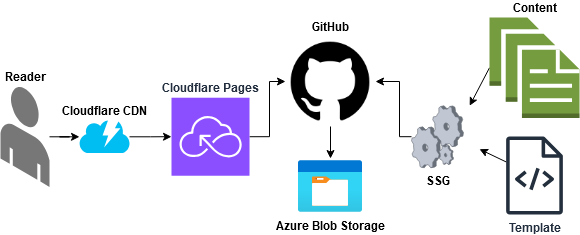
- Razor SSG Web Template provides static site generation capabilities for websites written in the Razor framework and implements a theme from which I derived the theme for this site.
- GitHub provides source control.
- Cloudflare Pages provides free hosting behind a global CDN and native integration with GitHub for CI/CD.
- Azure Storage provides durable backups of site content outside of GitHub.
1. Understanding the razor-ssg project
I won't spill a lot of ink on how razor-ssg actually works because it's covered in ServiceStack's fabulous YouTube video Using C# Razor SSG to Create Static Websites & Blogs in GitHub Codespaces. Watch it before proceeding, but note that we're going to deviate from what's outlined in the video by not using GitHub Actions and not using GitHub Codepsaces. More on that later...
2. Creating a GitHub repository
We'll start by setting up a GitHub repository called my-new-blog from the NetCoreTemplates/razor-ssg template and cloning our newly-created repository to the current directory on my local computer. The GitHub CLI makes this a breeze and combines both steps into a single action, but it's also possible to do it via the UI if you're so inclined.
gh repo create my-new-blog --template NetCoreTemplates/razor-ssg --private --clone
Since we're eschewing GitHub Actions/Workflows in favor of Cloudflare Pages' native GitHub integration we can delete the out-of-box build workflow (provided by the razor-ssg template we cloned). Failing to delete this will cause GitHub to perform a nuisance build on every push to your repo that will be ignored by Cloudflare (which will do its own build). If you're following along with the video I linked above this also means you will skip the section that outlines setting up GitHub Pages—not to be confused with Cloudflare Pages—and it also means you can delete the gh-pages branch from your repository.
cd my-new-blog
gh run delete # interactively delete the workflow run that is initiated as part of cloning the template
git push origin -d gh-pages # delete the gh-pages branch that is created as part of cloning the template
rm -rf .github # delete the GitHub workflow that is included in the cloned template
git commit -a -m "deleting default workflow in favor of Cloudflare Pages' built-in GitHub integration"
git push
For my own site I've also customized the theme a bit (ex: removing unwanted navigation links in the banner and footer, replacing the logo, adding a gradient to the banner, fixing a few html bugs, etc.) and I have of course removed the dummy pages. I'm happy to share my theme with anyone, but I am linking to the original NetCoreTemplates repository because they are much better positioned than I am to provide support and because of course I want to credit them for their work.
3. Installing dependencies and building the site locally
Now that we've cloned the repository we want to make sure that we can run and debug the site locally.
First we need to install the dependencies, which in this case is simply the .NET 8 SDK. .NET exists for Mac OS, Windows and Linux but for this blog post I'm using Ubuntu Linux 24.04:
sudo apt-get update && sudo apt-get install -y dotnet-sdk-8.0
Then we can simply run the following command to build the dynamic site, execute Microsoft's Kestrel web server to host the site and open a web browser pointed at our local web server:
cd MyApp
dotnet watch -c Release
NOTE
At this stage we're not invoking the static site generator and there really isn't any need to. When debugging the site locally during development or during content modifications (ex: adding blog posts) we want to be able to make changes on the fly without needing to rebuild after every single change. Using the watch command allows for what Microsoft calls "hot reload," meaning that changes to source files are immediately available to view in your browser simply by refreshing the screen.
Once the site is building on our local machine we can make whatever code changes we want and create our initial content, and we can do so using any editor we prefer. I'm using Microsoft's free Visual Studio Code for both the markdown (content) edits as well as site design (HTML/CSS), but there are plenty of other tools for both purposes and I can definitely appreciate the appeal of using something like Obsidian. One warning I'll make about using a full-fat markdown editor is that I did find Obsidian created certain markdown that didn't get interpreted properly by razor-ssg, requiring me to use a regular text editor to modify what Obsidian had created. Your mileage may vary.
4. Registering for a domain
Once we've got a site design we're happy with and some initial content we're ready to actually publish the site. If you're using Cloudflare for your domain you can create an account and then follow the instructions located here to purchase your preferred domain.
5. Creating a Cloudflare Pages deployment
Once we've purchased a domain we'll proceed to create a Cloudflare Pages deployment, the first step of which is to enable the GitHub integration. The GitHub integration requires a build script that will by executed by Cloudflare Pages upon each git push invocation, so we'll create that first in order to avoid a build failure upon initial setup of the integration. The general process for using Cloudflare Pages to host a Blazor site is well covered in Cloudflare's developer documentation, but below I have outlined the specific modifications to their basic build script.
First run the following command, the output of which should be an executable build.sh file located in the root of your cloned repository (making sure to replace "thenerdery.io" with your own domain):
cd my-new-blog
cat > build.sh << EOF
#!/bin/sh
curl -sSL https://dot.net/v1/dotnet-install.sh > dotnet-install.sh
chmod +x dotnet-install.sh
./dotnet-install.sh -c 8.0 -InstallDir ./dotnet
./dotnet/dotnet --version
./dotnet/dotnet build .
npm install -D tailwindcss
npm --prefix ./MyApp run build
./dotnet/dotnet run --AppTasks=prerender --environment Production --BaseUrl "https://thenerdery.io" --project ./MyApp
EOF
git update-index --chmod=+x build.sh
git add build.sh
git commit -m "Adding build script for Cloudflare Pages integration"
git push
Having done that we can now follow the instructions here, substituting the following information:
- Framework preset =
none - Build command =
chmod +x build.sh && ./build.sh - Build output directory =
./MyApp/dist
NOTE
For some reason I found that simply invoking the build script failed because Cloudflare Pages didn't mark the downloaded build shell script as executable after the build agent cloned the repository. I solved this by prepending chmod +x to the build command.
Upon clicking the "Save and Deploy" button your site should immediately kick off a deployment. If everything is successful you should have a working blog hosted at a URL that looks something like https://blog-c9d.pages.dev, and all that remains is to assign your custom domain by following the steps documented here.
That's it!
Coming soon
- Cloudflare Email Routing
- Automating site backups of GitHub and Cloudflare to Azure Storage blobs
- Blog comments
- Web traffic analytics
- Search engine optimization
- Monetization
- Optimizing Cloudflare settings (ex: cache TTL, aging out old deployments, etc.)
- Monitoring using Cloudflare notifications
- Cloudflare access policies